A couple of weeks ago, a software engineer friend from Bangalore called me up, visibly exhausted. He had sent out something like 64 job applications across Workday, Oracle Taleo, and Greenhouse over thirty days.
Zero callbacks. Just four automated rejection emails landing in his inbox at 2:15 AM.
Now, this guy is sharp. He has led distributed microservices teams, scaled backend pipelines, and handles Node.js and Kubernetes like second nature. So why did enterprise hiring portals discard his profile like yesterday's spam?
I asked him to send over his resume PDF.
The moment I downloaded his file, the problem was staring right at me. He had used a sleek two-column graphic template he found on Canva. It looked gorgeous on an iPad screen. But when I pushed that PDF through a standard Linux command-line text extraction parser, his work history merged sideways into his skills column. His company name combined with his college GPA.
To the Workday parser, his resume was not an impressive engineering profile. It was unreadable alphabet soup.
If you have been applying for weeks with zero traction, take a breath. It almost certainly has nothing to do with your qualifications or work ethic. It has everything to do with how corporate hiring software shreds your document before any human eye ever gets a look at it.
Here is the unfiltered reality of how enterprise ATS parsers operate in 2026, the quiet formatting traps you must avoid, and the exact keyword matching method we use to hit an 85%+ match score every single time.
---
What Workday, Taleo, and Greenhouse Actually Do Behind the Screen
Corporate recruiters at mid-to-large enterprises receive hundreds, sometimes thousands, of resumes for a single job opening. Do you honestly think an HR manager sits down with a mug of coffee and reads through 900 multi-page PDFs?
Not a chance.
Here is what really happens the millisecond you hit the "Submit Application" button:
1. Plaintext Stripping
The parser rips out your fonts, your margins, your color accents, and your profile photos. It boils your entire career down into a flat, unstyled string of plaintext. If you hid your skills inside an HTML table, an SVG badge, or a sidebar text container, older engines like Oracle Taleo drop those characters completely into the void.
2. Lexical & Synonym Tagging
The ATS engine runs your stripped plaintext through an internal skills taxonomy. It looks for direct nouns: "PostgreSQL", "Tailwind CSS", "Meta Ads", "B2B Pipeline Generation".
Modern systems have built-in synonym dictionaries—so if a job post says "GCP" and you wrote "Google Cloud Platform", smarter platforms like Greenhouse will usually bridge the gap. But older corporate installations of Workday and Taleo? They are notoriously stubborn. If they want "CI/CD Pipelines" and you wrote "automated deployment workflows", you get zero match credit.
3. The Recruiter's Match Dashboard
This is where the game is won or lost. The recruiter logs into their dashboard and sees an applicant leaderboard ranked by percentage match—from 0% to 100%.
Most recruiters apply a quick dropdown filter: "Hide applicants below 75% match."
Think about what that means. If your background is an 80% fit in real life, but your resume only scored 68% because you phrased your bullet points casually, nobody will ever open your file. You get auto-rejected by a cron job in the middle of the night.
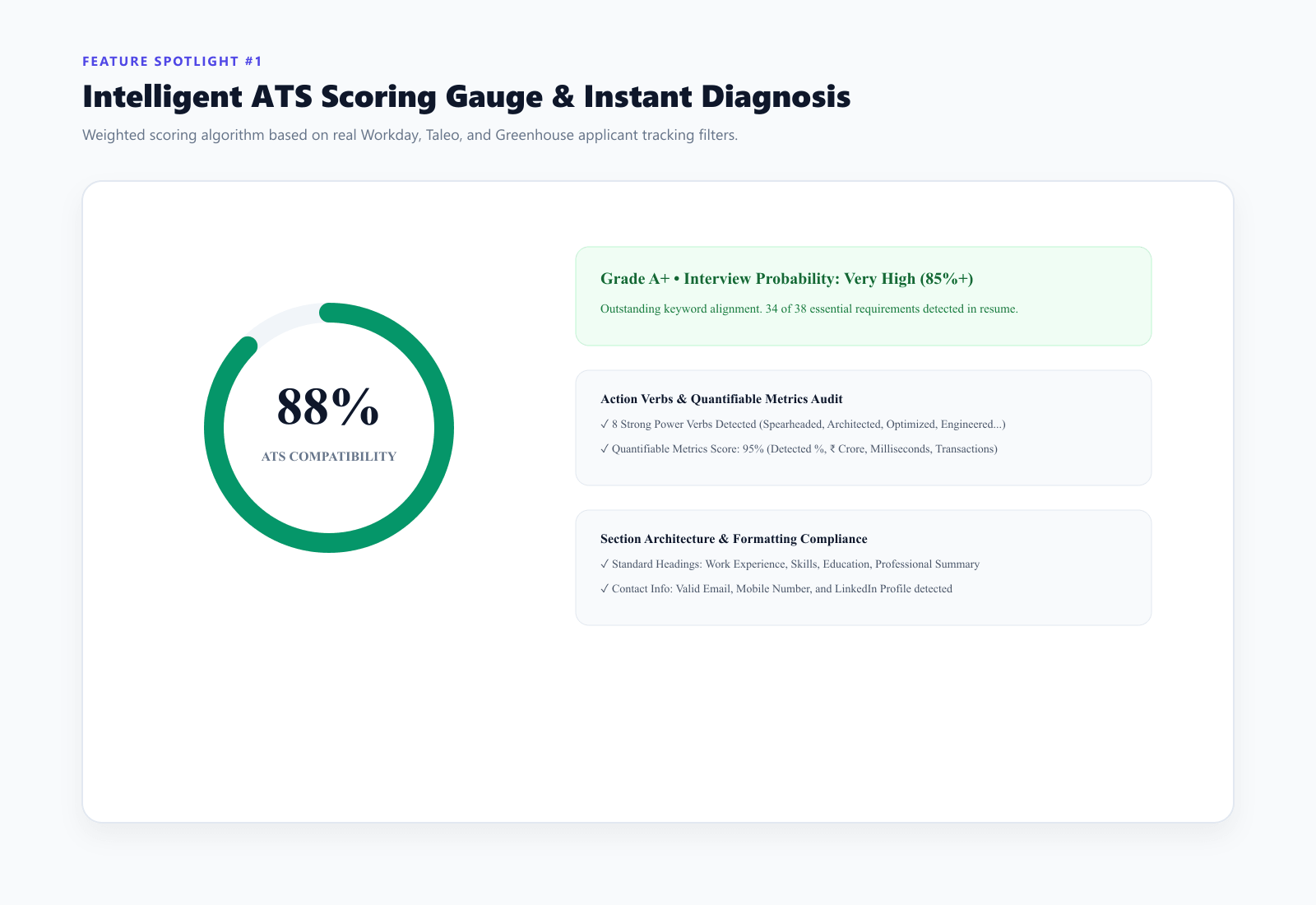
Real-Time ATS Live Scoring Gauge
---
4 Big Traps That Silently Ruin Your ATS Score
Before you rush to sprinkle new keywords across your document, you need to plug the parsing leaks first. These four mistakes ruin more qualified candidates than lack of skills ever will:
1. Multi-Column Formatting
I see this mistake constantly. Modern two-column templates are everywhere on Pinterest and design blogs. But PDF extraction software reads text from left to right across the horizontal plane. When an ATS parser encounters two columns, it reads line one of the left column, jumps straight across to line one of the right column, and combines them into gibberish.
- What you should do instead: Keep your entire document in a clean, single-column layout. Standard 0.7-inch margins, standard bullet points. Simple beats clever every time.
2. Funky Section Titles
Do not try to stand out by naming your work history "Where I've Made an Impact" or "My Professional Journey". Parsers are dumb machines that search for explicit anchor headers.
- What you should do instead: Stick to the time-tested standard headers:
Work ExperienceorProfessional ExperienceSkillsorTechnical StackEducationCertifications
3. Hiding Keywords in White Text
Some people still recommend pasting 50 keywords at the bottom of the page in 1pt white font. Please do not do this. Enterprise ATS platforms in 2026 check bounding boxes and color contrast ratios. If the system detects hidden text or zero-contrast font layers, your application gets immediately flagged as spam and rejected across that entire corporate employer domain.
4. Listing Skills Without Proof
Dropping thirty comma-separated buzzwords at the bottom of your resume ("Python, Docker, Kubernetes, AWS, GraphQL") barely moves the needle on modern parsers. Why? Because modern algorithms evaluate contextual frequency. A skill mentioned once in a loose list carries far less weight than that same skill woven directly into an achievement bullet with measurable business impact.
---
How We Match Keywords to Hit 85%+ (Step-by-Step)
Here is the exact method I use whenever I help peers tailor their resumes for competitive engineering or marketing roles:
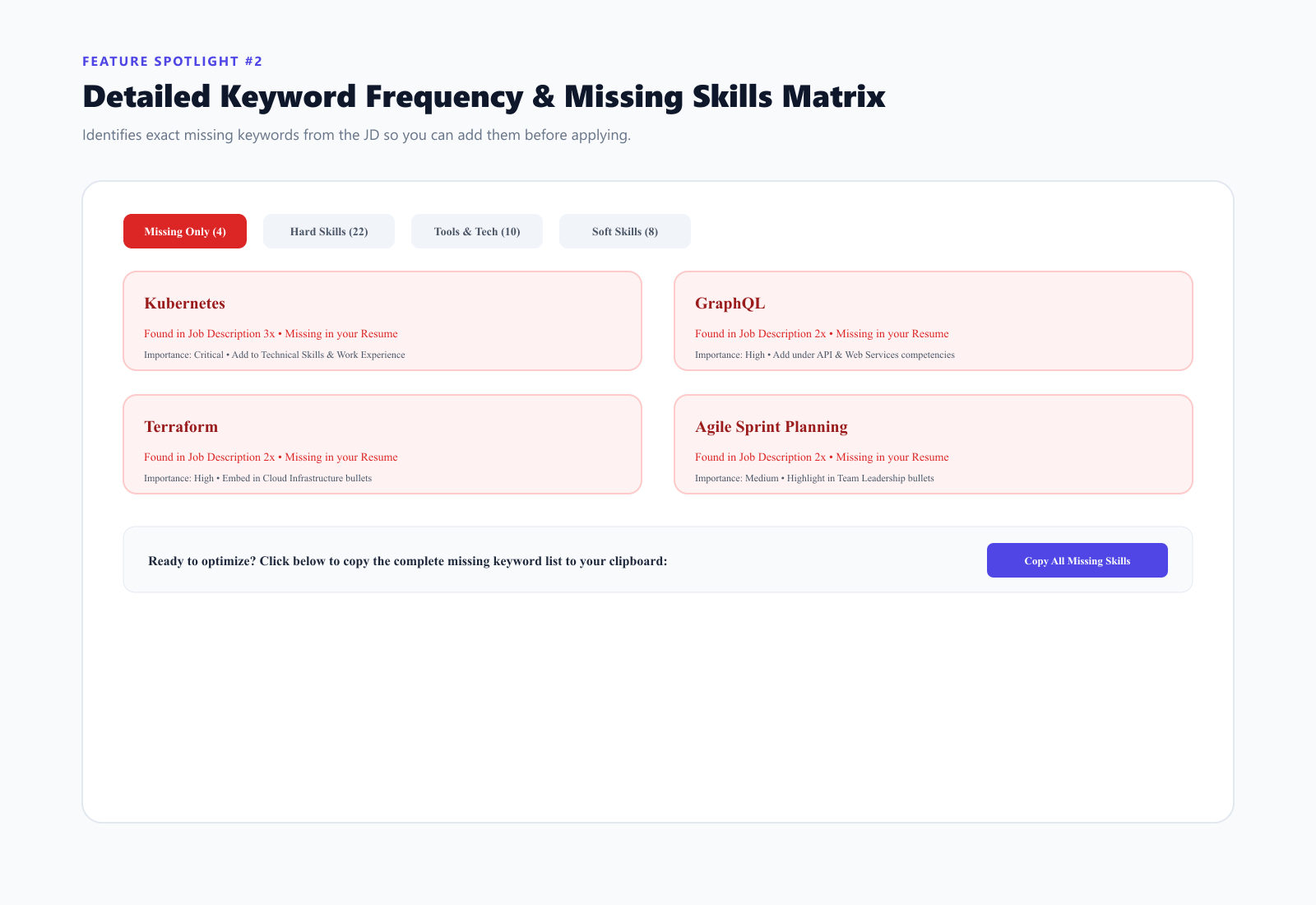
Categorized 800+ Skills Keyword Matrix
Step 1: Break Down the Job Description
Open the job description in a split screen. Look for the technical stack and daily responsibilities, and sort the requirements into three buckets:
- Core Hard Skills: The non-negotiable tools ("PostgreSQL", "React", "Next.js", "Figma", "Python").
- Operational Methodologies: How the team works ("Scrum sprint planning", "A/B conversion testing", "Microservices architecture").
- Domain Terminology: Industry-specific phrases ("SOC2 compliance", "B2B SaaS churn reduction", "CAC to LTV ratio").
Step 2: Calculate Your Baseline Score
Run your current resume against the job description to find your starting score.
- Anything below 60% means you are talking past the job description.
- Between 75% and 88% is the golden target zone.
- Avoid trying to force a 100% score—doing that makes your resume sound robotic and stuffed when an actual human recruiter reads it during the phone screen.
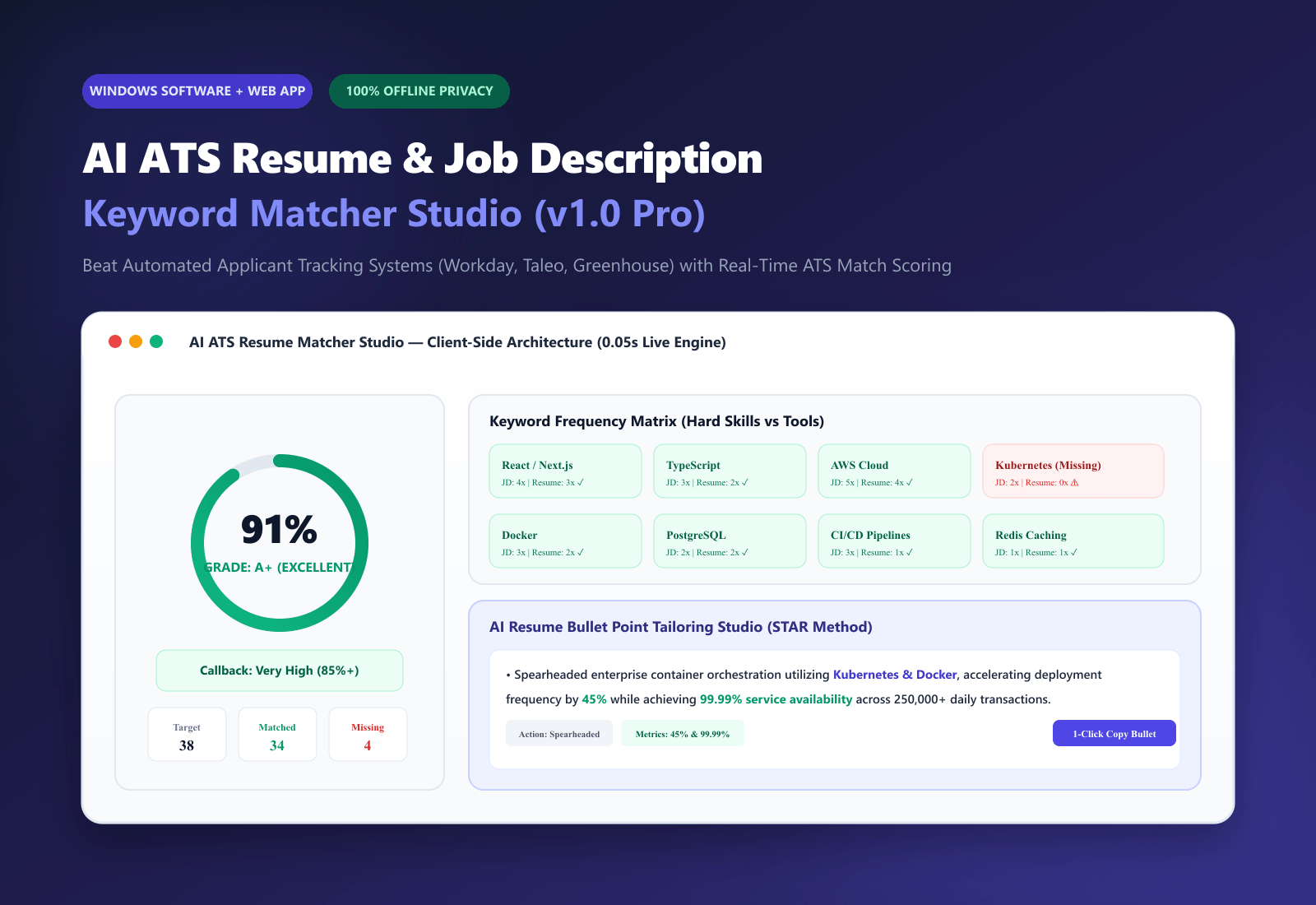
A Quick Practical Note: To speed this up without paying recurring monthly fees or risking data privacy, you can use our AI ATS Resume Matcher Studio. It runs completely locally on your computer, evaluates your resume against target job requirements in real-time, highlights missing skills across 800+ categories, and helps tailor bullet points offline.
Step 3: Upgrade Your Bullets with the Google XYZ Formula
Never write passive duties like "Responsible for improving web app performance and managing database queries." That scores terribly and bores hiring managers.
Instead, frame every past project using Laszlo Bock's famous formula: Accomplished [X], as measured by [Y], by doing [Z].
Look at this transformation:
- Weak (Match Score: 48%):
"Helped redesign our customer checkout flow and wrote clean code with modern web frameworks."
- Optimized (Match Score: 87%):
"Re-architected the checkout funnel using Next.js, TypeScript, and Tailwind CSS, integrating Stripe Webhooks to reduce abandoned carts by 24% across 85,000 monthly active users."
See what happened there? You didn't just stuff keywords. You gave the parser the exact nouns it was hunting for (Next.js, TypeScript, Stripe Webhooks) while showing the human hiring manager tangible business results.
---
ATS Platform Comparison (At a Glance)
Not all applicant tracking systems are built the same. Here is how the most common platforms handle your documents:
| System | Primary Users | PDF Parsing Reliability | Keyword Matching Behavior |
| :--- | :--- | :--- | :--- |
| Workday | Fortune 500, Banks, Global Tech | Medium (fails on tables & 2-column) | Strict exact-match string weighting |
| Oracle Taleo | Enterprise, Healthcare, Legacy IT | Low (fails on graphics & modern fonts) | Pure regex text scanner; favors Word (.docx) |
| Greenhouse | High-growth tech startups, SaaS | High (handles clean vector PDFs well) | Context-aware; groups synonyms smoothly |
| Lever | Mid-market tech, Design agencies | High (clean minimalist UI) | Emphasizes role titles and recent achievements |
---
Why Client-Side Privacy Matters for Job Applications
There is one important detail that job seekers rarely think about when using free online resume checkers: data privacy.
When you upload your CV to a random cloud-based resume scanner website, your full legal name, personal phone number, private email address, home location, current employer, and salary details get pushed to remote third-party databases. Many of these free websites monetize by selling aggregated candidate resumes directly to third-party recruitment agencies and data brokers.
That is why we built the AI ATS Resume Matcher Studio as a 100% client-side application. It runs directly inside your local browser or as a standalone Windows desktop software. Zero cloud databases. Zero telemetry. Your career history and contact details never leave your machine.
If you are also organizing your freelance consulting pipeline or tracking your project deliverables alongside job hunting, take a look at our 15 Excel Ready-to-Use Templates Vault and our The Ultimate 2500+ AI Prompt Vault to streamline your workflow.
---
Frequently Asked Questions
What is the safest file format to upload—PDF or Word (.docx)?
For modern applicant systems like Greenhouse and Lever, a clean single-column searchable PDF generated directly from Google Docs or Word is ideal because it locks your formatting in place. However, if you are applying through older enterprise portals like Oracle Taleo, a plain .docx file is often the safest bet because legacy Taleo parsers occasionally scramble PDF font encodings.
What match score should I aim for before submitting?
Aim for a score between 75% and 88%. Hitting this range ensures your resume comfortably bypasses automated recruiter cutoffs while remaining completely natural, engaging, and credible when a human hiring manager picks it up.
Does changing my resume for every application take too much time?
You do not need to rewrite your entire resume from scratch for every job. Keep a master resume containing your full career history. Then, spend five to seven minutes customizing the top three to five technical keywords in your professional summary and your most recent two work experience bullets. That small targeted tweak is usually enough to boost your score by twenty to thirty percentage points.
---
Need to scan your resume against an upcoming job description? Check out the AI ATS Resume Matcher Studio and run unlimited private scans offline today.