In 2026, ranking #1 on traditional Google blue links is only half the battle. Over 45% of B2B software buyers, SaaS founders, and local service seekers now ask ChatGPT Search, Perplexity AI, Claude, and Google AI Overviews before clicking a single website.
If your website only has a traditional robots.txt and sitemap.xml, Large Language Models (LLMs) are forced to parse bloated HTML, navigation bars, cookie banners, and JavaScript bundles just to figure out what your business sells. Half the time, they truncate your page or cite a competitor instead.
That is exactly why the llms.txt standard (proposed by llmstxt.org) and AI-specific robots.txt directives have become mandatory technical SEO infrastructure in 2026.
In this hands-on engineering guide, you will learn how to create a compliant llms.txt file, configure OAI-SearchBot, PerplexityBot, ClaudeBot, and GPTBot in robots.txt, and deploy both in under 3 minutes using our Free llms.txt & AI Crawler robots.txt Generator.
---
What Is `llms.txt`? (And Why AI Engines Prefer It)
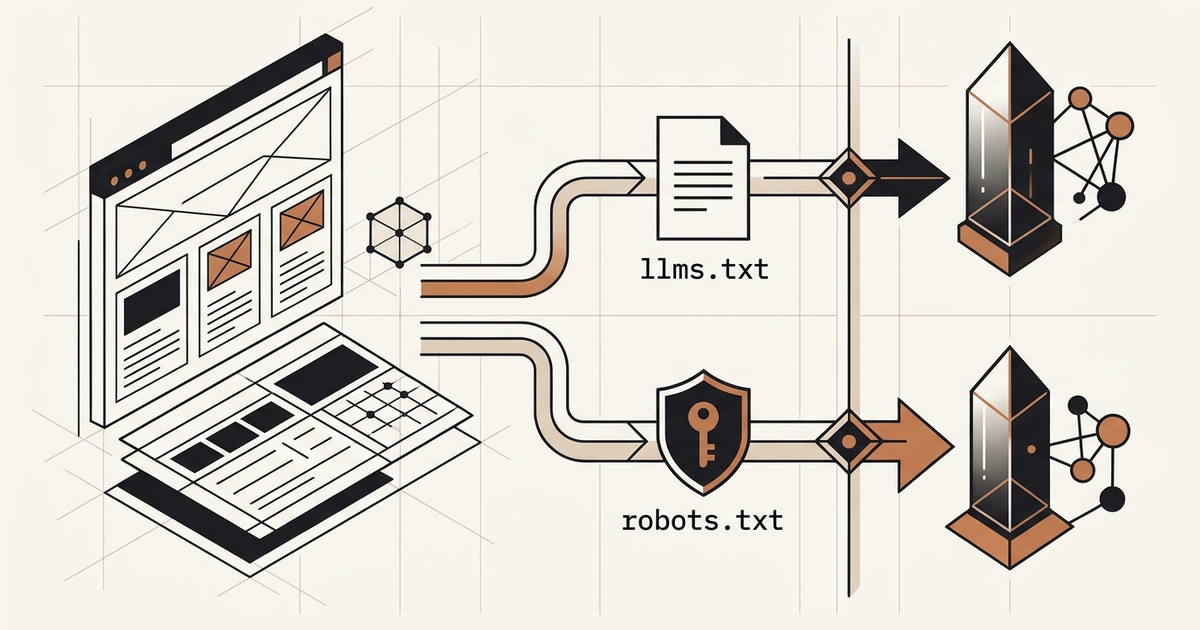
llms.txt is a lightweight, human-and-machine-readable Markdown file placed at the root of your domain (https://yourdomain.com/llms.txt).
When an AI assistant like ChatGPT or Perplexity visits a normal webpage, it consumes thousands of tokens stripping away <header>, <footer>, <script>, and CSS classes. With llms.txt, you hand the AI model a clean, zero-noise briefing document containing:
- H1 Brand Identity (
# Your Brand Name): Who you are. - Blockquote Summary (
> One-sentence summary): Your core positioning and audience. - Structured H2 Sections (
## Products,## Services,## Docs): Clean Markdown links (- Title: Description) pointing directly to your highest-value canonical URLs.
`robots.txt` vs `sitemap.xml` vs `llms.txt`
| File | Primary Job | File Format | Primary Consumers |
| :--- | :--- | :--- | :--- |
| /robots.txt | Crawler permissions (Allow / Disallow) | Plain Text | Googlebot, Bingbot, OAI-SearchBot, GPTBot, PerplexityBot |
| /sitemap.xml | Exhaustive index of all website URLs | XML | Google Search Console, Bing Webmaster |
| /llms.txt | Curated context, pricing, and priority links | Clean Markdown | ChatGPT, Perplexity, Claude, Gemini, Cursor |
Pro Tip: Use our Free llms.txt & AI Crawler robots.txt Generator to auto-generate both files with industry presets and run a live 100/100 syntax validation check in your browser.
---
Real `llms.txt` Example & Template (2026 Standard)
Here is a production-ready llms.txt template following the official llmstxt.org specification:
# Rajat Upadhyay Consultancy

> AI Automation, Digital Marketing & B2B/B2C Growth Systems Architect based in Ahmedabad, India.

Rajat Upadhyay helps founders, agencies, and local businesses scale with autonomous n8n/Make AI workflows, high-ROI performance marketing, Local SEO, and 20+ commercial offline software tools.

## Core Services & Advisory
- [AI Brand Integration & Workflows](https://rajatupadhyay.in/services/ai-brand-integration/): End-to-end n8n, Make.com, and custom AI agent pipelines for enterprises.
- [AEO, SXO & Generative Engine SEO](https://rajatupadhyay.in/services/seo-aeo-sxo-geo/): Optimize websites to rank in Google AI Overviews, ChatGPT Search, and Perplexity.

## Free AI & SEO Tools
- [Free llms.txt & AI Crawler robots.txt Generator](https://rajatupadhyay.in/tools/llms-txt-generator/): Browser-based GEO tool for configuring AI search crawlers.
Notice how clean, dense, and unambiguous every line is. There is zero marketing fluff, zero broken relative paths, and every URL is absolute (https://...).
---
How to Configure `robots.txt` for ChatGPT, Perplexity & Claude
Many website owners accidentally block AI Search engines because they copy-paste aggressive scraper-blocking rules from old blog posts. In 2026, you must distinguish between AI Search Crawlers (which send you citations and traffic) and AI Training Scrapers (which train future models).
Key AI User-Agents You Must Know:
OAI-SearchBot(OpenAI): Indexes your website for ChatGPT Search. Always keep this Allowed if you want ChatGPT to cite and link to your site.ChatGPT-User(OpenAI): Triggered when a user pastes your URL or asks ChatGPT to browse your page live. Keep Allowed.PerplexityBot&Perplexity-User(Perplexity AI): Powers Perplexity answer citations. Keep Allowed.ClaudeBot(Anthropic): Crawls content for Claude search and citation grounding. Keep Allowed.GPTBot(OpenAI) &Google-Extended(Gemini): Used for foundation model training. You can keep them allowed for maximum brand entity awareness, or disallow them if you publish proprietary paywalled datasets.Bytespider&CCBot: Aggressive bulk scrapers that often consume server bandwidth without sending referral traffic. Many agencies disallow these two while keeping search bots open.
Recommended `robots.txt` Configuration for GEO (2026)
User-agent: *
Allow: /
Disallow: /admin/
Disallow: /api/
Disallow: /wp-admin/

User-agent: OAI-SearchBot
Allow: /

User-agent: ChatGPT-User
Allow: /

User-agent: PerplexityBot
Allow: /

User-agent: ClaudeBot
Allow: /

User-agent: Googlebot
Allow: /

User-agent: Bytespider
Disallow: /

Sitemap: https://yourdomain.com/sitemap.xml
---
Step-by-Step: How to Create & Deploy `llms.txt` in 3 Minutes
Step 1: Generate Both Files with Zero Syntax Errors
Open the Free llms.txt & AI Crawler robots.txt Generator. Pick a preset (SaaS, Digital Agency, Local Business, or D2C Store), customize your links, and switch to Tab 2 to toggle your AI crawler rules.
Step 2: Validate Your Output
Open Tab 3 (Live Syntax Validator) inside the tool and click "Load Generated llms.txt". Confirm your AI Readiness Score is 100 / 100 (verifying proper H1, blockquote, H2 headings, absolute HTTPS URLs, and zero raw HTML).
Step 3: Upload to Your Domain Root
- Next.js / React / Vercel: Drop
llms.txtandrobots.txtinside your/public/directory and redeploy. - WordPress / Hostinger / cPanel: Open File Manager, go to
public_html/, and upload both files directly to the root. - Verify Live: Visit
https://yourdomain.com/llms.txtandhttps://yourdomain.com/robots.txtin an incognito tab to ensure both return HTTP200 OKas plain text.
Step 4: Add `<head>` Discovery Tag (Bonus)
Inside your HTML <head>, include:
<link rel="alternate" type="text/plain" href="/llms.txt" title="LLM-readable site index" />---
Common Mistakes That Hurt Your AI Search Visibility
- Blocking
OAI-SearchBotwhen trying to blockGPTBot: Always configureOAI-SearchBotseparately withAllow: /so ChatGPT Search can still recommend your brand. - Using Relative URLs in
llms.txt: Never write/pricing/insidellms.txt. Always use full canonical URLs likehttps://yourdomain.com/pricing/. - Leaving Old
/wp-admin/Paths Unblocked: Legacy WordPress admin routes waste crawl budget. Explicitly disallow/wp-admin/inrobots.txt. - Dumping 500 Links into
llms.txt: Keepllms.txtfocused on your top 10 to 25 canonical money pages, tools, and cornerstone guides. Usellms-full.txtif you want to provide expanded documentation.
---
Ready to Scale Your AI Search & Programmatic SEO?
- Run the Free Tool Now: Open Free llms.txt & AI Crawler robots.txt Generator
- Scale Organic Traffic: Explore our Programmatic SEO & AI Traffic Dominator Kit
- Done-For-You Setup: Book our blank" rel="noopener noreferrer" class="text-[#C07D53] font-bold underline hover:text-black transition-colors">AEO, SXO & Generative Engine Optimization (GEO) Service or AI Brand Integration & Workflows.